An assessor asks a lab manager to pull the calibration record for a specific instrument used in a flagged test result from 90 days ago. The lab manager opens three Excel files, checks a shared drive folder, and searches email for the certificate from the external calibration provider. They eventually find something that looks right, but they cannot confirm it without checking another spreadsheet. The assessor notes how long it took to retrieve the record. That note becomes a finding. This is why so many labs start looking for a calibration management system.
Most labs do not have a calibration problem.
They have a visibility problem.
The information already exists. It lives in spreadsheets, logbooks, email confirmations, and shared drive folders. The challenge is knowing what is current, what is due next, and what is already overdue before an auditor or missed deadline exposes the gap.
That is exactly what a calibration management system is designed to solve.
A Calibration Management System Gives You Visibility
ISO 17025 requires equipment calibration records and metrological traceability. Every instrument used in testing or calibration activities must have documented calibration status and records that demonstrate traceability.
The problem is that most labs already have those records.
They just cannot see the whole picture.
One spreadsheet tracks due dates. Another stores equipment information. Certificates sit in folders on a shared drive. Outlook reminders remind someone to schedule calibration, but they do not prove that it happened.
A calibration management system connects those pieces into one view so the entire status of every instrument is visible.
Why Spreadsheets Eventually Fail
Excel is flexible.
That is why so many labs start there.
One spreadsheet becomes two. Two become six. Before long, different people own different files, and nobody knows which one is current.
Outlook reminders help for a while.
Until someone dismisses one.
Or leaves the company.
Or forgets to update the spreadsheet after calibration is complete.
Nothing is technically missing.
Everything is simply disconnected.
That is why a calibration management system is not about replacing spreadsheets. It is about connecting the information they cannot.
What Auditors Actually Want
A2LA accreditation requirements do not focus on how you organize files.
They focus on whether you can demonstrate control.
ISO 17025 requires laboratories to maintain calibration records that demonstrate metrological traceability and document the calibration status of every instrument used during testing and calibration activities.
When an assessor asks for a record, they are asking more than one question.
They want to know:
- Was the instrument calibrated?
- Was it current when the work was performed?
- Can you prove it?
- Can you retrieve the supporting documentation quickly?
Labs managing calibration through spreadsheets and Outlook reminders typically cannot retrieve a complete calibration history for a specific instrument in under five minutes during an audit.
That delay creates unnecessary risk.
How LabMODO Handles Calibration Management

We built LabMODO around the way testing and calibration laboratories actually work.
Instead of managing calibration through disconnected tools, every instrument lives inside one calibration management system.
Each instrument has its own schedule.
Notifications are generated automatically before due dates. No Outlook reminders. No manual calendar updates.
Calibration certificates attach directly to the instrument record.
Nobody searches a shared drive wondering which PDF belongs to which event.
Each instrument also shows:
- Current calibration status
- Complete calibration history
- Pass or fail results
- Attached certificates
When calibration is completed, LabMODO automatically calculates the next due date based on the cadence assigned to that instrument.
Nothing needs to be recalculated manually.
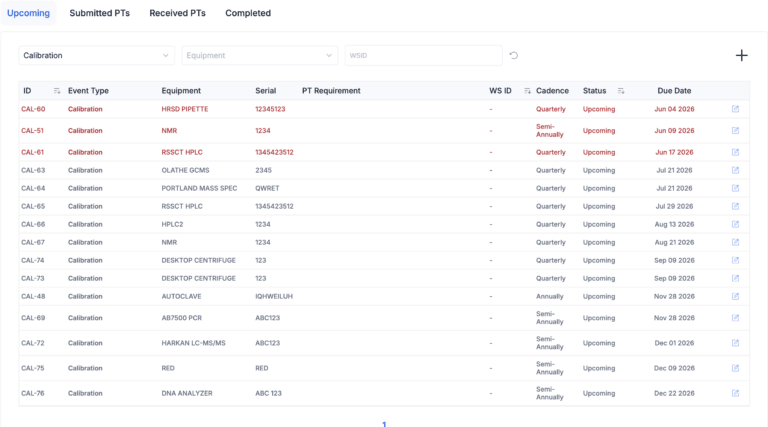
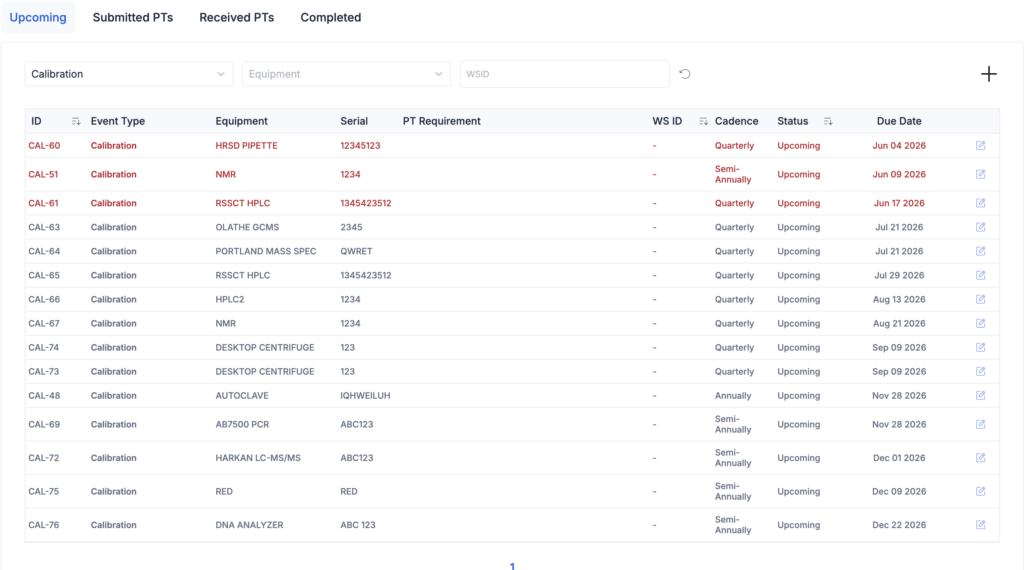
The Quality Schedule dashboard brings everything together.
Calibration events, maintenance events, and verification events all appear in one view with clear status indicators:
- Current
- Upcoming
- Overdue

If an instrument becomes out of service or out of tolerance, that status connects directly to the quality schedule.
Quality managers immediately know what requires attention.
For organizations with multiple locations, one quality manager can monitor every instrument across every laboratory from the same calibration management system.
See how our calibration management software for testing and calibration laboratories keeps equipment audit-ready without spreadsheets.
The Same Audit Looks Very Different
Let’s revisit the opening scenario.
The assessor asks for the calibration history of the instrument used in the flagged test.
This time, the lab manager opens LabMODO.
They search for the instrument.
One record appears.
The calibration history is already there.
The certificate is attached.
The current status is visible.
Previous calibration events appear in chronological order.
The assessor gets their answer in seconds.
No searching.
No guessing.
No finding.
That is the difference a calibration management system makes.
Better Decisions Before Deadlines Become Findings
Most missed calibrations do not happen because someone ignored the requirement.
They happen because nobody could clearly see what needed attention.
A spreadsheet only becomes useful after someone opens it.
A calibration management system surfaces upcoming work automatically.
Quality managers stop reacting to overdue calibrations and start preventing them.
That shift changes how the lab operates every day, not just during audits.
One System Instead of Six
Many laboratories already have every piece of information they need.
The problem is where it lives.
Equipment lists.
Certificates.
Schedules.
Email confirmations.
Maintenance records.
Verification events.
Each piece exists somewhere.
The challenge is bringing everything together.
A calibration management system creates one source of truth instead of asking people to assemble the answer every time someone asks a question.
Built for Testing and Calibration Laboratories
Many calibration platforms started in manufacturing.
Others were built for pharmaceutical companies.
Testing laboratories often end up adapting their workflow to fit software that was designed for someone else.
LabMODO took the opposite approach.
We built our calibration management system around ISO 17025 laboratories with small quality teams that need control without a lengthy implementation project or dedicated IT staff.
The goal is simple.
Know what is due.
Know what is current.
Know what needs attention.
Everything else should support those three things.
Audit Readiness Should Never Depend on Memory
Audit findings often begin with a simple question.
“Can you show me the calibration record?”
The answer should never depend on remembering which spreadsheet to open or which folder contains the right certificate.
A calibration management system replaces searching with visibility.
Every schedule.
Every certificate.
Every calibration event.
Every status.
Connected in one place.
If your team still manages calibration with Excel spreadsheets, Outlook reminders, and shared drive folders, it may be time for a system that gives you a complete view before an auditor asks for it.
Book a live demo of LabMODO and see how our calibration management system keeps every instrument scheduled, documented, and audit-ready.
https://www.labmodo.com/resources/calibration-management-software/