
SOPs Are Supposed to Help—But They Don’t
In this article
- Write for the User, Not the Lawyer
- Make SOPs Actionable with Tactical Workflows
- Make SOPs Easy to Find
- Automate Updates and Version Control
- Tie SOPs to Training
- Build SOP Reviews Into Your Workflow
- Get Feedback From Your Team
SOPs should make lab work easier. They should keep people safe, processes consistent, and labs audit-ready. But here’s the truth: most SOPs are ignored.
Why? They’re too long. Too dense. Too full of legal jargon to be useful.
If your team isn’t using your SOPs, it’s not their fault—it’s the SOPs. Let’s fix that.
Here’s how to create SOPs that your team will actually use:
Write for the User, Not the Lawyer
Most SOPs are written to cover liability. They focus on legal compliance instead of usability. This approach kills engagement.
How to Fix It
- Use simple, direct language. Your team doesn’t need a legal textbook—they need clear steps.
- Add visuals like diagrams, flowcharts, or videos. People learn faster when they see what to do.
- Keep it short. Focus on the essentials.Example:
Instead of writing, “Ensure adequate ventilation in compliance with OSHA standard XYZ,” write, “Turn on the ventilation hood before handling chemicals. “
Make SOPs Actionable with Tactical Workflows
SOPs fail when they tell people why something is important but don’t show them how to do it.
How to Fix It
- Break tasks into simple, step-by-step actions.
- Include troubleshooting tips for common problems.
- Group related SOPs into workflows. For example, “Equipment Use” might include calibration, cleaning, and safety checks.
Example Workflow for Using a Centrifuge
- Inspect for visible damage (include a photo).
- Set the rotor to the correct speed (include a table for sample types).
- Balance the tubes (add a tip: uneven tubes cause vibration).
Make SOPs Easy to Find
No one wants to dig through binders or outdated shared drives to find the SOP they need. When information is hard to access, people skip it and guess instead.
How to Fix It
- Use a centralized, searchable system for all SOPs.
- Make them accessible on any device—desktop, tablet, or phone.
- Include tags or categories like “Lab Safety” or “Chemical Handling” for quick navigation.Example Tool:
A cloud-based platform like LabMODO ensures your team can pull up the right SOP in seconds, whether they’re in the lab or on the go.
Automate Updates and Version Control
Outdated SOPs create confusion. If one person uses the old version while another uses the updated one, mistakes happen.
How to Fix It
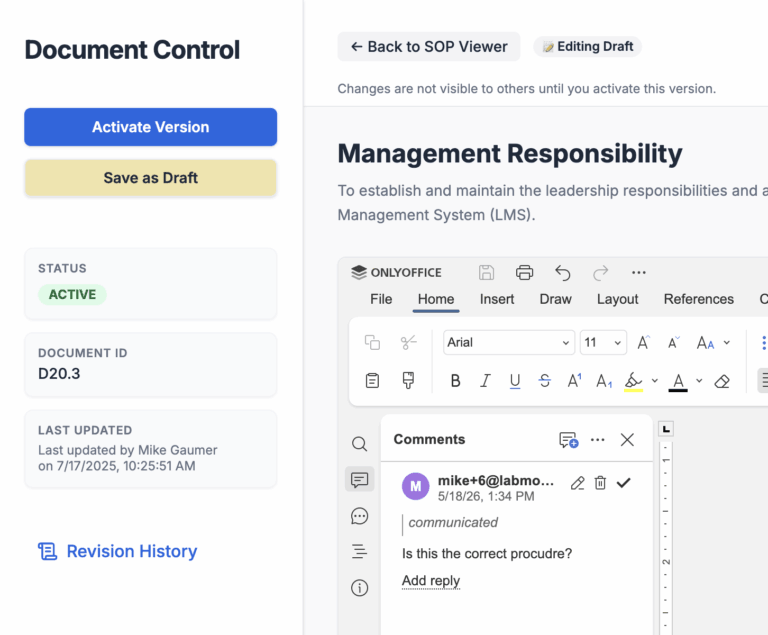
- Automate version tracking so everyone always sees the latest SOP.
- Archive old versions so they’re available for reference but not in active use.
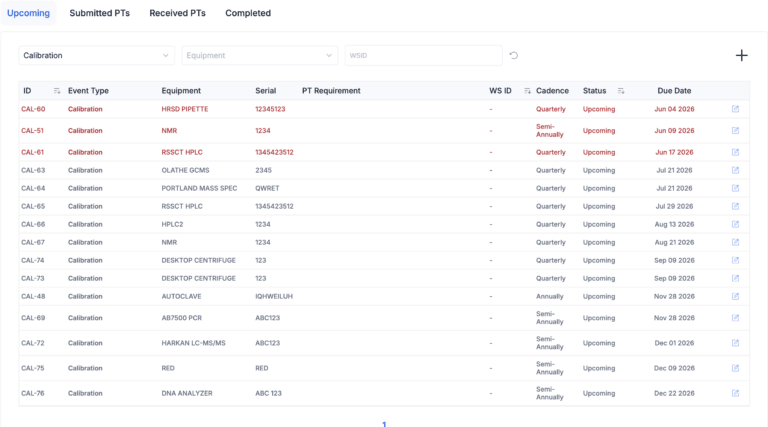
- Notify team members when updates are made and track who’s reviewed them.
Real-Life Example
A diagnostics lab reduced errors by 40% after switching from manual SOP updates to automated notifications.
Tie SOPs to Training
An SOP is useless if no one knows how to follow it. Training is the bridge between “having an SOP” and “using an SOP.”
How to Fix It
- Group SOPs into training modules. For example, “Lab Safety” might include five SOPs.
- Assign these modules to new hires automatically.
- Schedule periodic training refreshers so no one forgets critical steps.Impact:
Labs that integrate SOPs into training see faster onboarding and fewer compliance issues.
Build SOP Reviews Into Your Workflow
Regulations change. Processes improve. SOPs need to be reviewed regularly to stay relevant. But many labs skip reviews because the process is manual and time-consuming.
How to Fix It
- Automate reminders for SOP reviews.
- Assign specific owners to each SOP so there’s accountability.
- Use feedback from the team to improve clarity and usability.
Pro Tip
After every audit or incident, review the related SOPs to see if changes are needed.
Get Feedback From Your Team
The people using your SOPs know what works—and what doesn’t. If they think an SOP is confusing, they won’t use it.
How to Fix It
- Ask your team for input when creating or updating SOPs.
- Use surveys or one-on-one conversations to gather feedback.
- Make it clear that their input leads to changes.
Example Question
“What’s the most confusing step in this SOP, and how would you simplify it?”
SOPs Are a Tool—Make Them Work
SOPs aren’t just for compliance—they’re for your team. When you write SOPs that are clear, actionable, and easy to use, your lab becomes more efficient and less prone to mistakes.
Don’t let your SOPs collect dust. Make them a tool your team can rely on.
LabMODO helps labs automate SOP management, from updates to training integration.
Ready to make your SOPs work for your team? Let’s talk.